What Are CompTIA A+ Software Skills (And Why They Matter)?
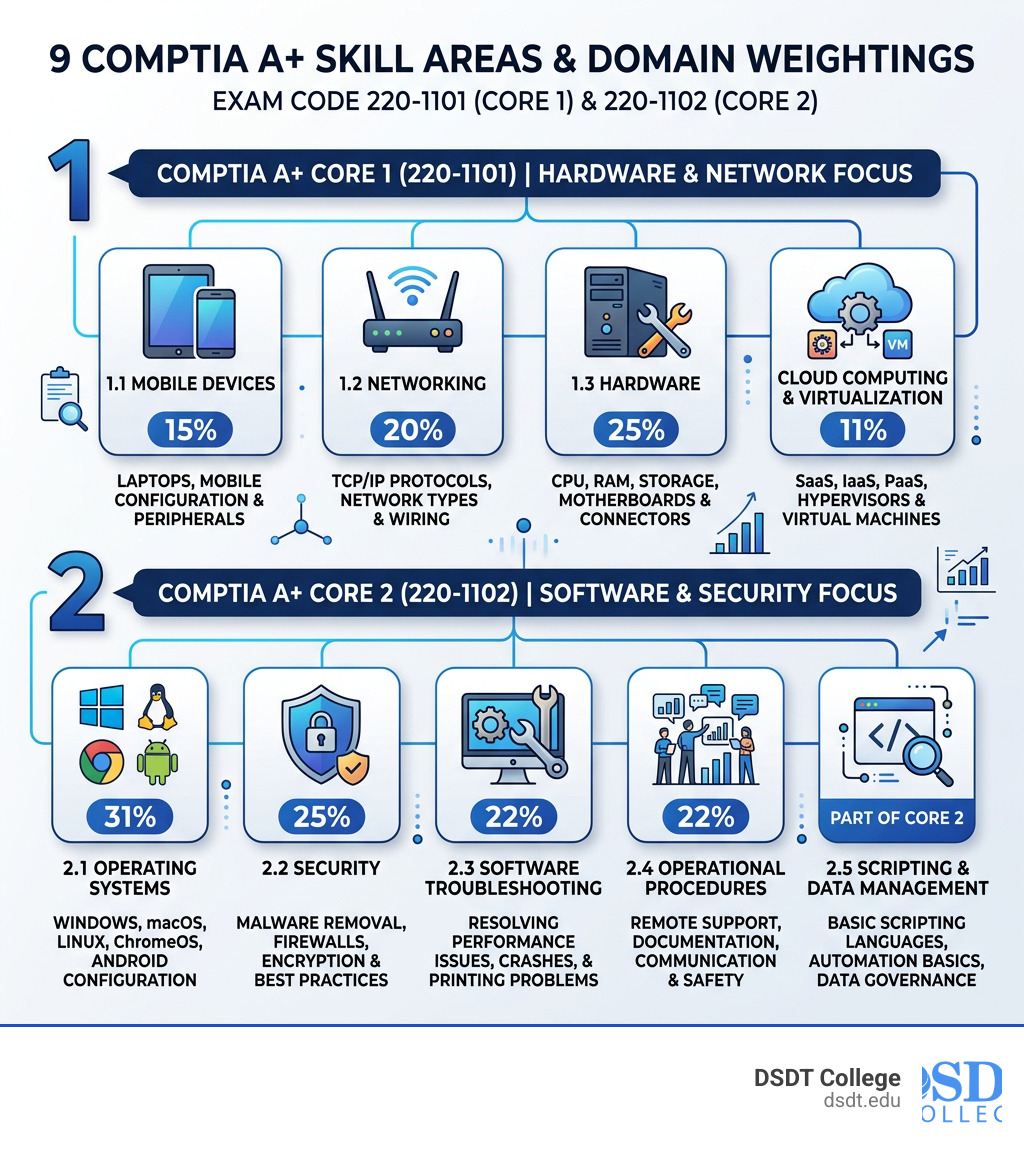
CompTIA A+ software skills are the core software competencies you need to pass the A+ certification and land your first IT job. Here’s a quick overview:
| Skill Area | What It Covers | Exam Weight |
|---|---|---|
| Operating Systems | Windows, macOS, Linux, ChromeOS, Android | 31% of Core 2 |
| Software Troubleshooting | Slow performance, crashes, printing issues | 22% of Core 2 |
| Security | Malware removal, encryption, firewalls | 25% of Core 2 |
| Cloud & Virtualization | SaaS, IaaS, PaaS, hypervisors | 11% of Core 1 |
| Scripting & Data Management | Automation basics, data governance | Part of Core 2 |
| Operational Procedures | Remote work support, SaaS apps, communication | 22% of Core 2 |
The CompTIA A+ certification is made up of two exams. Core 1 focuses mostly on hardware and networking. Core 2 is where software skills take center stage — covering everything from operating systems to cybersecurity to supporting remote workers.
This isn’t just about passing a test. Employers are actively screening resumes for A+ certification because it proves you can hit the ground running. In fact, 98.5% of employers rate critical thinking — a skill the A+ directly builds — as extremely important in IT candidates.
Whether you’re fresh out of high school, switching careers, or transitioning from the military, these software skills are your ticket into one of the fastest-growing job markets in the country.
I’m Jamie Kothe, a workforce development specialist and veteran training program developer with experience building IT career pathways and helping individuals master CompTIA A+ software skills for real-world job readiness. In the sections below, I’ll break down each skill area so you know exactly what to focus on.
Mastering Operating Systems: The Core of CompTIA A+ Software Skills
When we talk about CompTIA A+ software skills, the conversation usually starts and ends with Operating Systems (OS). This domain represents a massive 31% of the Core 2 (220-1102) exam. CompTIA expects you to be a “chameleon”—someone who can jump from a Windows desktop to a MacBook and then troubleshoot a Linux server without breaking a sweat.
The Big Players: Windows, macOS, and Linux
While Windows remains the dominant force in corporate environments, the modern IT professional must support a diverse ecosystem. We see this every day in markets like Detroit and Chicago, where tech hubs utilize a mix of platforms.
- Microsoft Windows: You’ll need to master installation, upgrades, and configuration. This includes knowing your way around the Control Panel, Settings, and Administrative Tools.
- macOS: Understanding the interface, system preferences, and unique features like Time Machine or Disk Utility is essential for supporting creative and executive teams.
- Linux: You don’t need to be a kernel developer, but you must understand basic command-line interface (CLI) tools. Knowing how to navigate directories and manage permissions in a shell is a foundational skill.
- Mobile & ChromeOS: With the rise of Chromebooks in education and Android/iOS in the palm of every employee’s hand, managing these “lightweight” operating systems is now a core requirement.
Command Line and System Configuration
A major part of mastering CompTIA A+ software skills is moving beyond the “point-and-click” interface. The exam tests your ability to use the Command Prompt (Windows) and Terminal (Linux/macOS) to diagnose connectivity and manage files.
Feature Comparison Table
To help you visualize the differences, here is a breakdown of how these systems compare in an enterprise environment:
| Feature | Windows | macOS | Linux |
|---|---|---|---|
| Primary User Base | Business/Corporate | Creative/Design | Servers/Developers |
| Source Model | Closed Source | Closed Source | Open Source |
| CLI Tool | Command Prompt/PowerShell | Terminal (Zsh/Bash) | Terminal (Bash) |
| Update Method | Windows Update | App Store/System Settings | Package Managers (apt, yum) |
Advanced Software Troubleshooting and Security Protocols
If the Operating Systems domain is the “what,” then Software Troubleshooting is the “how.” This area makes up 22% of the Core 2 exam. It’s where your critical thinking skills are put to the ultimate test. Employers aren’t just looking for someone who knows where the buttons are; they want someone who can figure out why the buttons aren’t working.
Common Troubleshooting Scenarios
The A+ curriculum focuses on real-world headaches that plague modern offices. You will be expected to resolve:
- Slow Performance: Is it a runaway process, a fragmented drive, or malware?
- OS Crashes: Learning to interpret the “Blue Screen of Death” (BSOD) or the macOS “Spinning Pinwheel” is vital.
- Printing Issues: This is the classic IT support trope for a reason. You’ll need to troubleshoot print spoolers, drivers, and network permissions.
Security: The “Security-First” Mindset
In the past, security was a separate conversation. Today, it is woven into every aspect of CompTIA A+ software skills. Security makes up 25% of the Core 2 exam, focusing on protecting the “end-point”—the device the user is holding.
We teach our students that security isn’t just about software; it’s about protocols. You’ll learn:
- Malware Removal: A seven-step professional process to identify, quarantine, and remediate infected systems.
- Authentication and Encryption: Understanding multi-factor authentication (MFA) and how to secure data at rest using tools like BitLocker or FileVault.
- Firewalls: Configuring both host-based and network-based firewalls to block malicious traffic.
The financial stakes are high for those who master these skills. For instance, the average annual base salary for computer technicians starts around $50,461, but as you specialize in security, those numbers can climb significantly.
Cloud Computing, Virtualization, and Scripting Essentials
One of the biggest shifts in the latest A+ version (the 1100 series) is the increased focus on the “invisible” side of IT: the cloud and automation. Even in entry-level roles, you are expected to understand how virtual environments function.
Virtualization and Hypervisors
Virtualization allows one physical computer to run multiple “virtual” machines (VMs). This is crucial for testing software or running legacy applications. You’ll need to know the difference between:
- Type 1 Hypervisors: “Bare metal” hypervisors like VMware ESXi that run directly on hardware.
- Type 2 Hypervisors: Software like VirtualBox that runs on top of an existing operating system.
The Cloud Models: SaaS, IaaS, and PaaS
You don’t need to be a cloud architect, but you must know the “as-a-Service” alphabet soup:
- SaaS (Software as a Service): Think Microsoft 365 or Gmail. The provider handles everything; you just use the app.
- IaaS (Infrastructure as a Service): You rent the “hardware” (servers, storage) in the cloud.
- PaaS (Platform as a Service): A middle ground used primarily by developers to build apps without managing the underlying server.
Scripting and Data Management
Wait, do IT support techs need to code? Not exactly. But you do need to understand scripting basics. The A+ exam introduces you to Python, JavaScript, and VBScript. The goal isn’t to write the next big app; it’s to recognize malicious code and use simple scripts to automate repetitive tasks like mapping network drives or backing up files.
Mastering these areas can lead to high-paying roles; for example, cybersecurity specialist career pathways often start with these foundational cloud and scripting competencies.
Supporting the Modern Hybrid and Remote Workforce
The world of work has changed, and the CompTIA A+ software skills curriculum has changed with it. IT professionals are no longer just walking over to a coworker’s desk; they are supporting users in different time zones using different home internet setups.
Remote Troubleshooting and SaaS
When a user is working from home in Grand Rapids or Lansing, you can’t just swap out their hardware. You have to rely on remote desktop tools and your ability to troubleshoot SaaS applications. The exam emphasizes:
- VPN Configuration: Ensuring remote workers can securely tunnel into the corporate network.
- IoT Security: Managing the risks of “Smart Home” devices (like connected thermostats or cameras) that might be on the same network as a work laptop.
- Mobile Device Management (MDM): Using software to push security policies to phones and tablets remotely.
Professionalism and Communication
We often say that the most important “software” you’ll ever use is your own brain. “Operational Procedures” make up 22% of the Core 2 exam. This includes documentation, professionalism, and effective communication. If you can fix a computer but you’re rude to the customer, you haven’t actually solved the problem.
Why These Skills are Crucial for Entry-Level IT Success
Why do we put so much emphasis on these specific CompTIA A+ software skills? Because they are “vendor-neutral.” This means the things you learn—like how to troubleshoot a network or secure an OS—apply whether you’re working for a small startup in Columbus or a massive healthcare system in New York.
Resume Building and Job Readiness
The A+ is the “industry standard” for a reason. It proves to hiring managers that you have the equivalent of 12 months of hands-on experience.
- Critical Thinking: 98.5% of employers rate this as a top priority. The A+ exam uses “Performance-Based Questions” (PBQs) that simulate real-world problems, proving you can think on your feet.
- The “Chameleon” Effect: By mastering multiple operating systems and cloud models, you become a versatile asset who can adapt to any tech stack.
For high school graduates or veterans transitioning into civilian life in cities like Detroit or Dallas, these skills provide a clear, accredited path to a stable and lucrative career.
Frequently Asked Questions about CompTIA A+ Software Skills
What are the fundamental CompTIA A+ software skills?
The fundamentals include mastering Operating Systems (installation, configuration, and CLI), Software Troubleshooting (diagnosing crashes and performance issues), Security (malware removal and encryption), Cloud/Virtualization (SaaS and VM management), and Operational Procedures (documentation and remote support).
How does the exam test software troubleshooting?
The exam uses a mix of traditional multiple-choice questions and Performance-Based Questions (PBQs). These PBQs put you in a simulated environment—like a virtual Windows desktop—and ask you to fix a specific problem, such as a broken network connection or a misconfigured email client. Troubleshooting accounts for roughly 22% of the Core 2 exam.
How do scripting and data management fit into CompTIA A+ software skills?
Scripting is used for automation and security. You’ll learn to identify common script file types (.ps1, .py, .sh) and understand how they can be used to streamline IT tasks or, conversely, how they might be used by hackers to run malicious code. Data management focuses on the data lifecycle, ensuring information is backed up, stored securely, and disposed of according to governance standards like GDPR.
Conclusion
Mastering CompTIA A+ software skills is about more than just passing two 90-minute exams; it’s about building a foundation for a lifelong career in technology. From the command line to the cloud, these competencies are exactly what modern employers are looking for in cities from Baltimore to Phoenix.
At DSDT College, we specialize in turning these complex topics into hands-on, practical learning experiences. Whether you are a high school graduate looking for a fast-track into the workforce, a veteran seeking to translate your skills, or an adult learner ready for a change, our programs are designed to get you certified and employed. We focus on the high-demand certifications like A+, Network+, and Security+ that lead directly to jobs in IT support, cybersecurity, and beyond.
Ready to turn these software skills into a paycheck? Start your journey today with our CompTIA A+ certification training and take the first step toward a “breeze” of an exam and a brilliant career.