When IT Goes Wrong, This Guide Keeps You Calm
The CompTIA A+ troubleshooting guide gives you a clear, repeatable system to diagnose and fix almost any IT problem — fast.
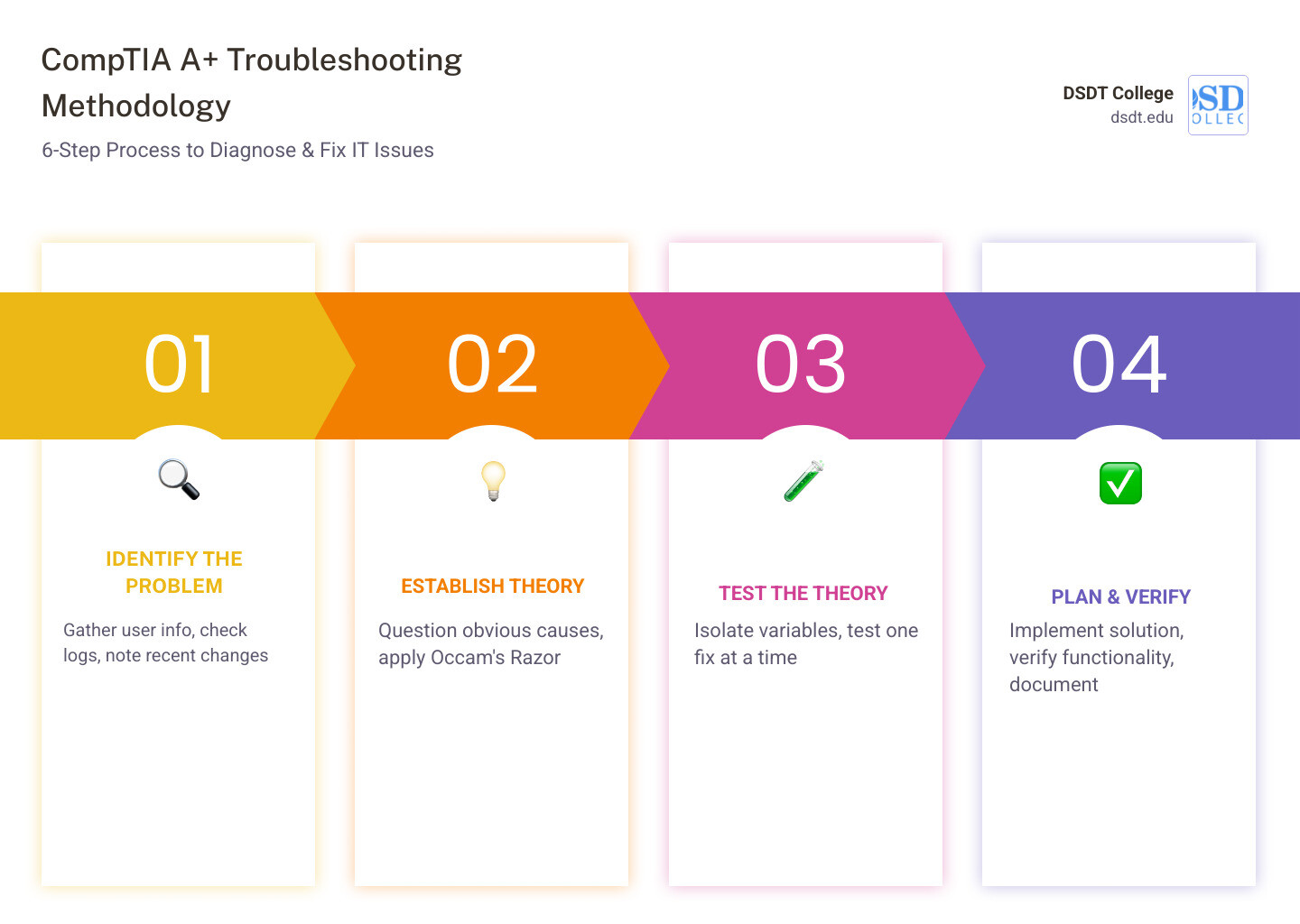
Here are the 6 official steps you need to know:
- Identify the problem — gather info from the user, check logs, note recent changes
- Establish a theory of probable cause — start simple, question the obvious
- Test the theory — isolate variables, try one fix at a time
- Establish a plan of action and implement the solution — assess risk, follow change management
- Verify full system functionality and implement preventive measures — confirm the fix works, prevent recurrence
- Document findings, actions, and outcomes — record everything for future reference
Picture this: it’s your first day as an IT support tech. The phone rings. A panicked user says their computer just died and they can’t access critical records. Your heart races. Where do you even start?
That moment is exactly why the CompTIA A+ troubleshooting methodology exists. Instead of guessing or jumping to random fixes, it gives you a structured, step-by-step process that works — whether you’re a brand-new tech or a seasoned pro.
This approach isn’t just for the exam. Hardware and network troubleshooting makes up 29% of the CompTIA A+ 220-1101 exam, and it’s one of the most practical skills you’ll use every single day on the job.
The difference between a technician who panics and one who stays calm? Process.
I’m Jamie Kothe, a workforce development professional with experience building training programs and guiding career changers into high-demand fields — including IT certifications like the ones covered in this CompTIA A+ troubleshooting guide. I’ve seen how mastering a structured methodology transforms beginners into confident, job-ready technicians. Let’s walk through every step together.
The Core of IT Support: Why the CompTIA A+ Troubleshooting Guide Matters
In Information Technology, problems aren’t just inconveniences; they are “downtime,” and downtime costs money. Whether we are helping a small business in Detroit or a major healthcare facility in Chicago, our goal is the same: restore service quickly and professionally.
According to exam specifications, hardware and network troubleshooting comprises nearly one-third of the questions on the CompTIA A+ 220-1101 exam. This highlights just how much the industry values a systematic approach over random trial-and-error. By following a 220-1101 Hardware and Network Troubleshooting Study Guide, we move from being “the person who fixes computers” to a true IT professional.
A structured methodology doesn’t just help you pass a test; it builds your career foundation. The average annual salary of a PC technician is approximately $43,854, but in high-demand areas like New York, that number can climb to $55,000 or more. Mastering these steps is your ticket to those higher-tier roles.
Step-by-Step: Mastering the CompTIA A+ Troubleshooting Methodology
The secret to great troubleshooting is the order of operations. We always start with the least invasive steps first. You wouldn’t replace a motherboard before checking if the power cord is plugged in, right?
To keep these steps straight during a high-pressure exam or a frantic service call, many technicians use mnemonics. A popular one is: “I Eat Tasty Fish Very Delicately” (Identify, Establish theory, Test theory, Formulate plan, Verify, Document). Another fun one is “I Eat Tacos Every Valentines Day.” Use whatever sticks in your brain!
Step 1: Identifying the Problem with the CompTIA A+ troubleshooting guide
The first step is all about gathering information. We need to be part detective and part psychologist. We start by talking to the user, but we have to ask the right questions.
- Gather information: What exactly is happening? Are there error messages?
- Identify user changes: Did the user install new software or move the desk recently?
- Inquire about environmental/infrastructure changes: Was there a power outage? Did the network team update the switches over the weekend?
- Review system logs: Check the Windows Event Viewer or web console alerts.
- Perform backups: Before we touch anything, we ensure the user’s data is safe.
| Question Type | Example | Why Use It? |
|---|---|---|
| Open-Ended | “What were you doing when the error occurred?” | Encourages the user to provide details and context. |
| Closed-Ended | “Is the power light on right now?” | Great for verifying specific facts or physical states. |
Step 2: Establish a Theory of Probable Cause
Once we have the facts, we brainstorm. This is where we question the obvious. We use a principle called Occam’s Razor, which suggests that the simplest explanation is usually the right one.
Before assuming the CPU has melted, we check the power cables, look for loose physical connections, and ensure the monitor is actually turned on. If the simple stuff doesn’t pan out, we conduct internal research (checking our company’s knowledge base) or external research (vendor websites and forums) to find similar symptoms.
Step 3: Test the Theory to Determine the Actual Cause
Now we see if our “hunch” holds up. The golden rule here is to isolate variables. Change only one thing at a time. If you swap the RAM and the power supply at once, you won’t know which one was actually broken.
If your theory is confirmed, you move to the next step. If it’s not? Go back to Step 2 and establish a new theory. If you find yourself stuck after exhausting all your theories, this is the point where you escalate the issue to a senior technician or third-party support.
Step 4: Establish a Plan of Action and Implement the Solution
Once we know the cause, we need a roadmap to fix it. This isn’t just about the “how,” but also the “when” and “who.”
- Risk Assessment: Could this fix cause data loss or more downtime?
- Corporate Policies: Does the company allow us to open the case, or must we send it to the manufacturer?
- Change Management: In large environments like those in Columbus or Phoenix, you often need a “change window” to implement fixes so you don’t disrupt other workers.
- Rollback Procedures: Always have a “Plan B” in case the fix makes things worse.
Step 5: Verify Full System Functionality and Implement Preventive Measures
The fix isn’t done just because the computer turned back on. We must verify full system functionality. If the user couldn’t print, we don’t just clear the queue; we print a test page to make sure it works.
This is also the time for preventive measures. If a virus caused the crash, we update the antivirus and provide some quick user education on safe link-clicking. If a computer was sluggish due to dust, we might schedule a quarterly cleaning.
Step 6: Documentation and the CompTIA A+ troubleshooting guide
We know, we know—documentation feels like “extra work.” But in the professional IT world, if it isn’t documented, it didn’t happen.
According to the CompTIA Troubleshooting Process for the A+ Certification Exams, recording your findings, actions, and outcomes is critical. This creates a “paper trail” for compliance, helps teammates who might face the same issue later, and builds a searchable knowledge base for the entire organization.
Beyond the Basics: Applying the CompTIA A+ troubleshooting guide to Real-World Scenarios
Theory is great, but how does this look when the “smoke” is literal? Let’s look at some common hardware symptoms you’ll encounter in places like our Lansing or Dallas labs.
- POST Beep Codes: If a computer beeps and won’t start, the BIOS is trying to tell you something. We consult vendor documentation to “translate” those beeps.
- BSOD (Blue Screen of Death): These cryptic errors often point to failing RAM or driver conflicts.
- Overheating: If a PC shuts down randomly during heavy tasks (like Excel or gaming), we check the fans and look for “capacitor swelling” on the motherboard.
- Burning Smells: Shut it down immediately! This usually indicates a short circuit or a failing power supply.
Troubleshooting Networks and Cloud Services
Modern IT isn’t just about the box under the desk; it’s about the connection to the world. We use a specific set of tools for network diagnostics:
- Ping: Checks if a device is “alive” on the network.
- IPConfig: Shows your current IP address and gateway.
- Traceroute: Shows the path data takes to reach a destination—great for finding where a connection is “dropping.”
- NSLookup: Diagnoses DNS issues (when you can’t reach a website by name).
When dealing with cloud services like Office 365 or Google Workspace, we always check SaaS status pages first. Sometimes the problem isn’t your computer; it’s the provider’s server!
Mobile Devices and Peripheral Challenges
Mobile troubleshooting often involves MDM (Mobile Device Management) policies. If a phone in our Tampa or Seattle market won’t sync email, we check if the user changed their password or if the device is “out of compliance” with company security rules.
For printers, we look at the print spooler or driver versions. A common exam scenario involves a user who “can’t print,” only to find the printer is simply “offline” in the Windows settings.
Exam Success: Cracking Performance-Based Questions (PBQs)
The CompTIA A+ exam isn’t just multiple choice. You will face Performance-Based Questions (PBQs) that put you in a virtual lab. To ace these:
- Read carefully: Identify keywords like “first step” or “most likely.”
- Map to the methodology: If the question says a tech has already gathered info, your next step is likely establishing a theory (Step 2).
- Manage your time: Don’t get stuck on one simulation.
- Practice at home: Set up a home lab using VirtualBox or VMware. Break things on purpose, then use the 6-step model to fix them!
Frequently Asked Questions about CompTIA A+ Troubleshooting
What is the most important step in the CompTIA troubleshooting model?
While every step is vital, Step 1 (Identify the Problem) is the foundation. If you misidentify the problem, you will waste hours fixing something that isn’t broken.
How do corporate policies impact the troubleshooting process?
Corporate policies dictate what you are allowed to do. For example, a policy might forbid you from opening a laptop case because it voids the warranty. Always check the “playbook” before you act.
What are the most common hardware symptoms to watch for on the A+ exam?
Keep an eye out for “loud clicking” (failing hard drive), “distorted images” (failing video card), and “inaccurate system date/time” (bad CMOS battery).
Conclusion
At DSDT College, we believe that the best way to learn IT is by doing. Whether you are a high school graduate in Detroit, a veteran in San Antonio, or a career changer in Orlando, our programs are designed to take you from “chaos to calm.” We provide hands-on training that aligns directly with industry certifications like CompTIA A+, Network+, and Security+.
Ready to turn your problem-solving skills into a high-demand career? Our instructors bring decades of real-world experience to help you master the technical and soft skills needed for success. Start your CompTIA A+ Certification Training with us today and join a community of professionals dedicated to keeping the world connected.